
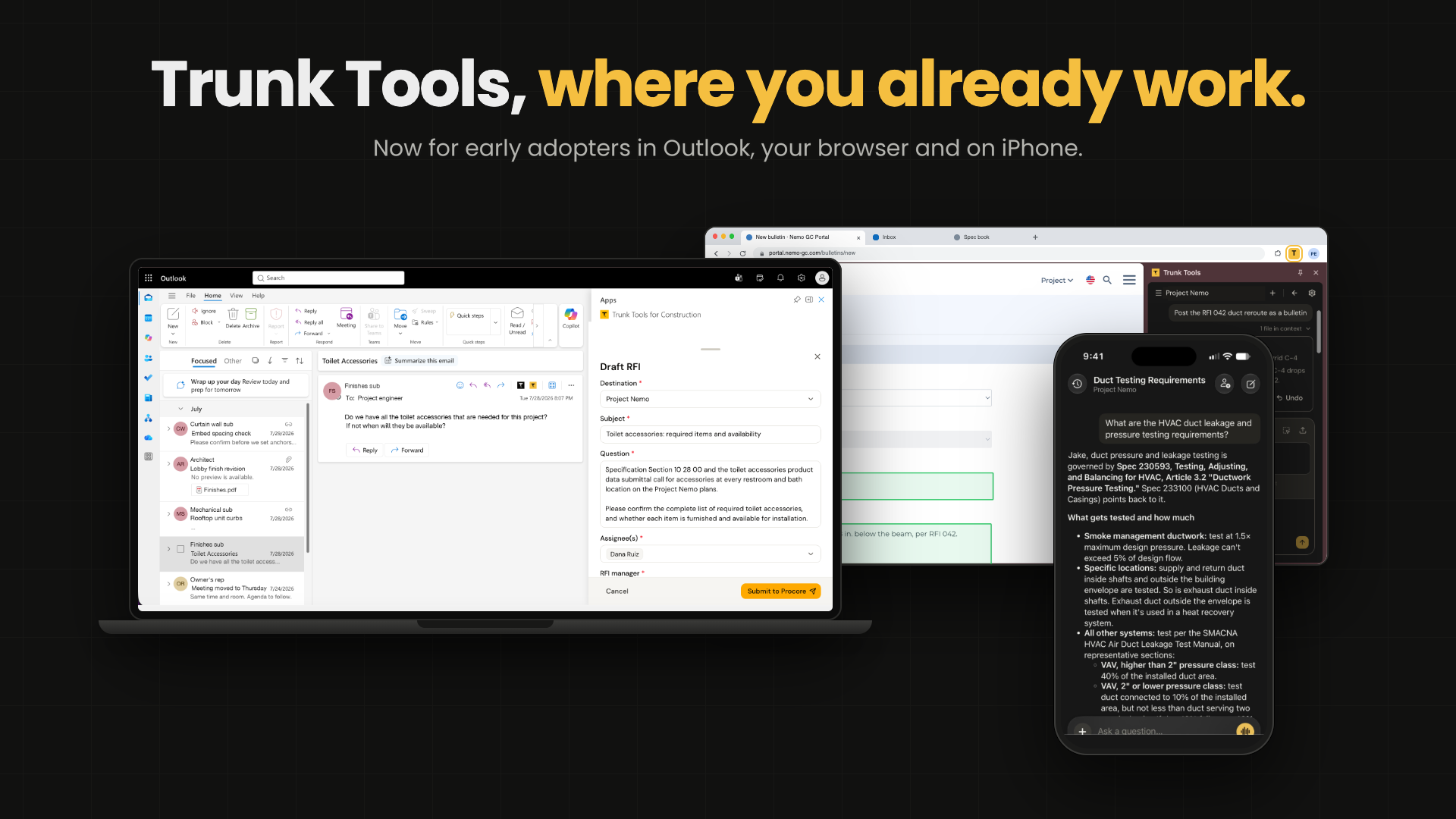
The way we do work is changing. Trunk Tools now puts construction AI in Outlook, in the Chrome and Edge browsers, and on iPhone, all now for early adopters, so a project answer reaches people in the email, the web form or the slab edge where the question came up. On site, the iPhone app also brings Field Notes, which captures a site walk, and Daily Logs, which drafts the day's log for the superintendent to submit to Procore. Answers come with their sources: across Trunk Tools projects, 73.9% of answers cite two or more sources (platform data).
The short answer: Trunk Tools now works in Outlook, in Chrome and Edge, and on iPhone, so your team can ask about a project from an email, a web page or the job site and get the answer with its sources.
Where is construction work heading?
Software has long asked a project team to come to it. Answers lived in a portal, a shared drive or a document set, and getting one meant leaving the work to go and look.
AI changes that. It can read a project's drawings, specs, submittals and requests for information (RFIs) and answer a question in plain English, with the source. Trunk Tools connects to the systems a project already runs on, including Procore, Autodesk Construction Cloud, SharePoint, Box, Dropbox and Egnyte, so one question can draw on all of them. Once software can do that, the answer can show up wherever the question does: in an email thread, in a web form, on the deck. The record of the day can take shape while the day is still happening.
That is the direction we are building in. Everything below is now for early adopters, and it is the first part of that picture.
Where do project questions come up?
Picture a project engineer on a mid-rise job at 7:40 in the morning. A subcontractor's email asks whether the curtain wall embed spacing changed in the latest bulletin. A project manager two desks over is retyping the same submittal details into a web form for the third time this week. Up on the fourth floor, the superintendent has the concrete foreman asking the same embed question at the slab edge.
Three people, one question, three different places. Until now, each of them had to stop, open Trunk Tools in its own tab, and come back.
How does Trunk Tools work in Outlook?
Open an email and the Trunk Tools panel works on it with you.
- Summarize the email or the whole thread.
- Draft a reply that uses the attachments, your contacts and calendar, and your project's documents. A person always presses send.
- Turn the email into an RFI. TrunkRFI first checks whether the answer already exists in the project documents or earlier RFIs, then drafts the RFI for your project management system. Across Trunk Tools projects, 19.5% of potential RFIs were already answered in project documents or prior RFIs (platform data).
You pick the project for each conversation. Your IT team turns the add-in on for your company, and our team works with them to set it up.
What does the browser extension do?
The Trunk Tools extension for Chrome and Edge works on the web pages your team already uses.
- Ask about the page you have open, and get an answer that also draws on your project's documents.
- Get a summary of a long page.
- Ask it to fill in the form. You see every value it entered, dropdowns included. Nothing is submitted, and Undo puts the old values back.
Like the Outlook add-in, your IT team turns the extension on for your company. People can't add it on their own.
What can you do on iPhone?
Field teams have had two ways to reach Trunk Tools from site: a browser bookmark or a text message. Customers told us the mobile browser asked them to log in again almost every day. Now there is an iPhone app.
- Ask your project a question. Trunk Tools searches your drawings, specs, submittals and RFIs, answers in plain English, and lists the source documents so you can open them.
- Check TrunkSubmittal review results from the field.
Back on that fourth floor, the superintendent asks the embed question in the app, opens the sheet the answer came from, and shows the foreman. The pour stays on schedule. Downstairs, the project engineer answers the same question from the email, with the same source.
What are Field Notes and Daily Logs?
Two more tools in the iPhone app help with the record of the day. Daily logs usually get written at the end of a long day, from memory, and they are the record a delay claim is built on.
- Field Notes. Take photos as you walk the site. The walk posts to the day's field notes, tied to the places you passed through, and everyone on the project sees the same day. One tap adds the day's notes to the daily log, and you approve each entry.
- Daily Logs. Trunk Tools drafts the day's log trade by trade, and the superintendent adds photos and notes from the field. When it's ready, the superintendent submits it to the project's daily log in Procore.
What doesn't it do yet?
We'd rather you hear the limits from us.
Outlook
- It works on the email you have open. It does not sync your inbox, and emails and attachments are not saved to the project's documents.
- Replies are drafted when you ask. Nothing is drafted or sent automatically.
- It does not create records in your project management system straight from an email; RFIs go through TrunkRFI after you review them.
Browser
- Chrome and Edge only.
- It does not handle pages that keep loading as you scroll, or PDF forms opened in Chrome's own PDF viewer.
iPhone
- iPhone and iPad only for now.
- Agent results are view-only. You can see a submittal review, but you can't start a new run from the app.
- No offline access to documents, no markup or record editing, and outside Daily Logs, no writing records back to Procore or Autodesk Construction Cloud yet.
- TrunkBrowse, TrunkBid and TrunkRegister stay on the web, and documents are added to a project from the web.
Field Notes and Daily Logs
- Daily Logs does not read photos attached to daily logs in Procore yet, so you can't ask questions about those photos.
- Procore is the only system a daily log submits to for now.
Frequently asked questions
Is Trunk Tools in Outlook available now? The Outlook add-in, the browser extension and the iPhone app are all now for early adopters. Your IT team turns on the add-in and the extension for your company, and your Trunk Tools team can set up early adopter access to the iPhone app.
Does the Outlook add-in send emails for me? No. It drafts a reply when you ask, and a person always presses send.
Which browsers does the extension work in? Chrome and Edge.
Does the iPhone app work on iPad? Yes. The app works on iPhone and iPad for now.
See it on your project
Trunk Tools customers can talk to their Trunk Tools team about turning on Outlook and the browser extension, and about early adopter access to the iPhone app. If you're new to Trunk Tools, book a demo and we'll show all three on a real project.